


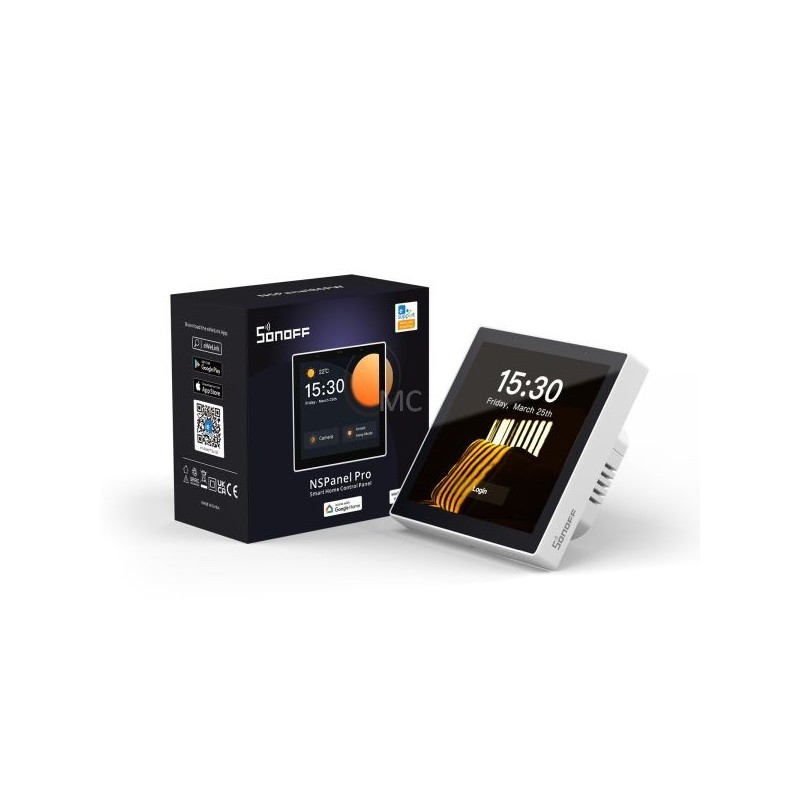
Sonoff NSPanel Pro, released in Q1 2023, is a smart home control panel with touch screen, with embedded Zigbee + Bluetooth smart home hub, all-in-one. Lighting, switches, heaters, sockets and plugs, almost all eWeLink smart devices can be controlled from it. NSPanel Pro is therefore ot just a mini wall-mounted touch tablet, as it also contains a built-in standard Zigbee 3.0 bridge function, it can also be used as a Zigbee gateway. From firmware version v1.5.6 a Bluetooth (eWeLink-Remote) hub function has also arrived. NSPanel Pro is available with an dim gray and white frame. This is the white frame version.. Main features of Sonoff NSPanel Pro:. Control panel for controlling your Wi-Fi eWeLink devices. You can control your Wi-Fi smart home devices (compatible with eWeLink app) from the NSPanel PRO control panel from max 3 screen of your NSPanel Pro: you can see on/off status and also turn them on/off from NSPanel Pro, or see the data and status of the eWeLink sensors... Control panel for manualeWeLink scenes. You can also set up a screen with your favourite eWeLink (manually run) Scenes, also used for group control of multiple devices. With one touch on NSPanel PRO, you can start the desired scene. For example, you can create "I arrived home" and "I left home" scenes to turn off the lights, or to disable or enable certain scenes... Embedded Zigbee gateway. NSPanel PRO also features an eWeLink platform compatible Zigbee bridge, compatible with all Zigbee 3.0 standard eWeLink-compatible sensors, light switches, relays, and sockets. Pairing Zigbee devices with NSPanel Pro can be either started from the NSPanel touch interface or from the eWeLink app as usual. It is compatible ot only with eWeLink Zigbee devices and standard Zigbee 3.0 devices from other manufacturers (of the type supported by the eWeLink app), but also with Philips Hue Zigbee bulbs and IKEA Zigbee bulbs. Like the Sonoff Zigbee Bridge Pro, the Zigbee bridge also supports three Security modes: HOME, AWAY, SLEEP. The active mode can be both set in the eWeLink app (on the phone) and on NSPanel Pro touch screen. You can set which sensors should be active in home / away / sleep modes, when NSPanel PRO's speaker gives a local sound alarm. For example, in HOME mode, only the Zigbee opening sensor on the front door should alarm, in AWAY all motion sensors should also alarm, and in SLEEP (sleep) mode, the living room and front room motion sensors should also alarm... Bluetooth gateway. From firmware version v1.5.6, an eWeLink-Remote (Bluetooth) hub function was also added to the device, so if you pair battery-operated wireless eWeLink-Remote (Bluetooth) switches (e.g. Sonoff R5 switch or S-MATE module) with it, the NSPanel will act as a Bluetooth receiver and hub, enabling you to control other WiFi eWeLink devices through the cloud... Display camera video feed. You may add eWeLink app-compatible cameras to NSPanel Pro to display the live video feed on NSPanel PRO's LCD display. It is also compatible with eWeLink Camera app running on a mobile phone, but also RTSP protocol compatible and DIY (ESP32-CAM) cameras can be added on the NSPanel Pro interface. (RTSP cameras and ESP30-CAM cameras will only appear on the NSPanel screen, ot in eWeLink app.). So an NSPanel Pro installed in the hall ext to the entrace can be used as a "video phone" as you can see on the NSPanel Pro screen who is standing at the gate or in front of the front door. Or you may use it to see what the situation in a certain room of the house or in the garden. In the case of eWeLink cameras that support two-way audio, you can also hear the voices around the camera and speak back through the camera's speaker... Intercom: calls between eWeLink app and NSPanel Pro, or between two NSPanel Pros. An intercom voice call can be made between several NSPanel Pros installed in different rooms of the house, or you may call any NSPanel Pro using the eWeLink app running on your phone or tablet... Energy panel. In the case of eWeLink devices equipped with a consumption measurement function, the consumption measured by the devices can also be monitored on an NSPanel Pro screen. Thermostat function. In the eWeLink app, you can also create (even more) cloud-based thermostat-like settings. To do this, we just have to specify which temperature sensor data we want to use (e.g. a Sonoff or SmartWise wireless Zigbee thermometer), we have to specify which eWeLink switch relay (or switch) we want to connect with it, and we can already set it for automatic or manual control switching. You can choose between heating and cooling modes. (A hysteresis between 1 and 5 degrees can be specified for switching on/off.). Web browser. In the eWeLink app, you can set arbitrary web addresses, which can be opened with a single touch on the 480x480 px, 3.95" screen of the NSPanel Proon your home screen. Compatibility, further upgrades. NSPanel Pro is a Home Assistant compatible device. With a firmware update in Q4 2023, it will also receive Matter compatibility... Other features: alarm clock. timer. current and 7-day weather forecast (the city can be set). adjustable volume. adjustable screen off time. adjustable wallpaper. Hardware features:. 4.95" TFT LCD screen with 480x480px resolution, multi-touch support. It supports 16.7 million colors. two-way audio support (microphone + speaker). thanks to the built-in light sensor, it is also possible to adjust the screen brightness automatically. 4-core Cortex-A35 CPU. Mali-G31 GPU. 8GB eMMC ROM. 2GB DDR3 RAM. it can also be installed in a wall socket (phase+zero is required for operation), but a table holder is also available Firmware updates:
To purchase a product in our online store, select the product you like and add it to your shopping cart. Next, go to the Cart and click on "Checkout" or "Quick order".
When placing a quick order, write your full name, phone number and e-mail. The manager will call you back and clarify the conditions of the order. Based on the results of the conversation, you will receive a confirmation of the registration of the goods by mail or via SMS. Now it remains only to wait for delivery and enjoy the new purchase.
Placing an order in the standard mode is as follows. Completely fill out the form in successive stages: address, delivery method, payment, information about yourself. We advise you to write in the comments to the order information that will help the courier find you. Click the "Checkout" button.
Pay for purchases in a convenient way. There are 3 payment options available in the online store:
- Cash on pickup or delivery by courier. The specialist will contact you on the day of delivery to clarify the time and prepare the change from any banknote in advance. You sign shipping documents, deposit funds, receive goods and a check.
- Cashless payment for self-delivery or registration in the online store: Visa and MasterCard cards. To pay for the purchase, the system will redirect you to the server of the ASSIST system. Here you need to enter the card number, expiration date and the name of the holder.
- Electronic systems for online ordering: PayPal, WebMoney and Yandex.Money. To make a purchase, the system will redirect you to the payment service page. Here you need to fill out the form according to the instructions.
Save time on ordering. There are 4 delivery options available in the online store:
- Courier delivery works from 9.00 to 19.00. When the goods arrive at the warehouse, the courier service will contact you to clarify the details. The specialist will offer to choose a convenient delivery time and specify the address. Inspect the packaging for integrity and compliance with the specified configuration.
- Pickup from the store. A list of outlets to choose from will appear in the shopping cart. When the order arrives at the warehouse, you will receive a notification. To receive an order, contact the employee in the checkout area and give the number.
- Postamat. When the order arrives at the outlet, a unique code will be sent to your phone or e-mail. The order must be paid at the parcel terminal. Shelf life - 3 days.
- Postal delivery via Russian Post. When the order arrives at the branch, a notice of the parcel will be sent to your address. Before paying, you can evaluate the condition of the box: weight, integrity. You can open the box yourself only after paying for the order. One order can contain no more than 10 items and its value should not exceed 100,000 rubles.
An additional tab to place information about the store, delivery, or any other important content. It will help you answer the buyer's questions and dispel his doubts about the purchase. Use it at your discretion.
You can remove it or bring it back by changing one checkbox in the component's settings. Very comfortably.